
Chatbot Flow Analytics - Know where your visitors drop out (Beta)
1598362200001
New
Feature
What’s the Problem?
After creating a playbook and taking it live, you would always want to optimize the engagements by improving the flow. But without accessible data on at what stage your visitors are dropping off, you would only rely on guesswork to optimize and it won’t work always.
What’s New
We have released Beta Version of ‘Flow Analytics’ which show you node wise data on
- Total Users - Total number of visitors reaching to the node
- Engagement - Total number of visitors engaging with the node
- Abandoned - Total number of visitors abandoning the conversation after they reached the node
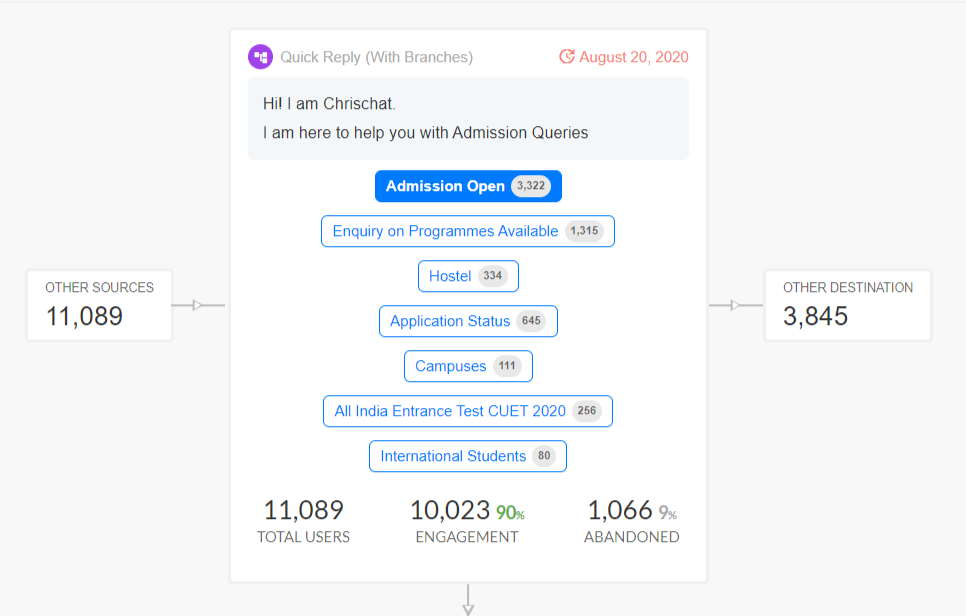
It also shows the numbers of visitors clicking on individual options given in the node.
You can select a time span for which you want to see the data.
How to see Flow Analytics?
To see the analytics for a flow, follow these steps
- Go to AI Builder
- Select the playbook for which you want to see the flow analytics
- Click on Analytics tab to see the analytics for the flow

- Select the dates to see the data between some specific dates

Published by Chatbot